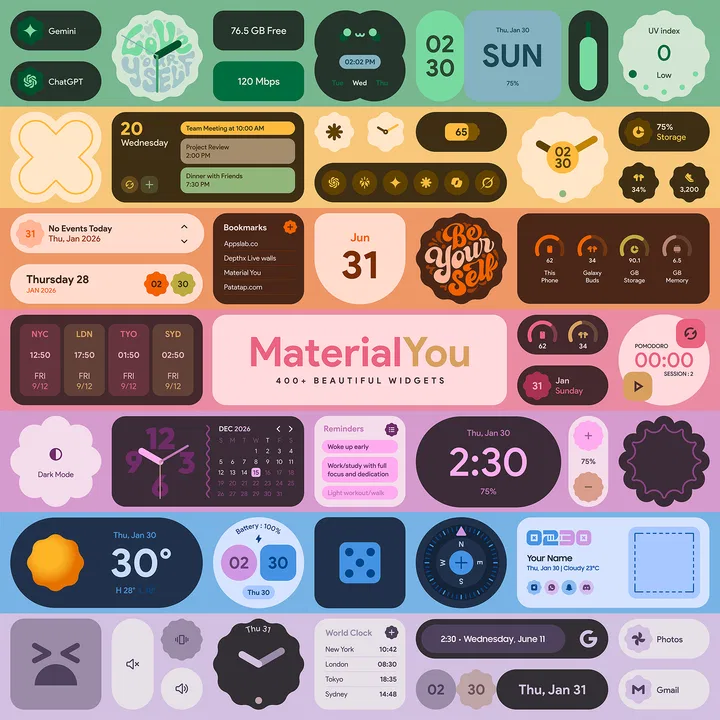
Material You Widgets
- 4.3
- Rating
- 50.00K
- Installs
- $1.00
- Price

 Analysis by App-foxy
I came away from Material You Widgets with a fairly clear impression: it is a focused personalization app for people who want their home screen to feel more intentional without rebuilding every part of their phone. Its appeal is not simply the number of widgets. The stronger idea is consistency. The collection is built around Material You and Material 3 expressive design, so the widgets are meant to sit comfortably beside a modern Android interface rather than look like unrelated decorations placed on top of it.
That makes the app easy to understand. If your current home screen feels plain, mismatched, or dependent on several separate widget apps, this gives you a single place to explore a large visual collection. I tested it with the mindset of someone who wants a cleaner daily setup, not a complicated customization project, and I found the experience most convincing when I treated the widgets as part of a layout rather than as individual eye candy.
There is also a practical catch. This is a paid app at $1.00, and it includes optional in-app purchases ranging from $1.99 to $9.49 per item. That does not automatically make it poor value, but it means the buying decision deserves a little more thought than the short description suggests. The right question is not whether the collection looks attractive; it is whether its particular design language matches the way you use your phone.
You May Also Like

 Blood Strike: 2.5 Anniversary
Blood Strike’s Loadouts Turn Every Drop Into a Tactical Gamble
A close look at Blood Strike’s custom loadouts: how fast access to signature weapons reshapes its battle royale rhythm, rewards preparation, and narrows the gap between fights.

 Pandora - Music & Podcasts
Pandora’s Music Is Easy to Start, but Harder to Recover
Pandora’s strength is its low-effort path from a seed to a station. Its weak spot is how much confidence it asks you to place in connection, setup, and quiet recovery.

 8 Ball Pool
 Is Built on Rivalries, Rematches, and Routine
A close look at the rivalries, rematches, shared routines, and unanswered safety questions that turn a quick pool match into a persistent mobile community.

 Samsung Music
’s Quiet Strength Is Playing What You Already Own
Its reach comes less from spectacle than from dependable access to a personal library. That simplicity is both the app’s strongest retention engine and its ceiling.

 AccuWeather: Weather Radar
AccuWeather Review: A Quick, Clear Forecast for Everyday Decisions
For everyday plans, the best forecast is the one you can understand quickly. AccuWeather makes rain timing, radar, and local conditions easy to act on, with a few trade-offs.

 Hill Climb Racing
Why Hill Climb Racing Still Turns Crashes Into One More Run
A tiny car, a bumpy hill and one more upgrade: Hill Climb Racing keeps resurfacing because its simple chaos makes every near-miss feel personal.
More From Our News Desk



What makes the widget collection stand out
The main strength is visual direction. Many widget tools offer a mixture of clocks, calendars, weather panels, toggles, and decorative blocks that come from noticeably different design traditions. Material You Widgets feels more coherent because its collection is inspired by the same broad language. Rounded shapes, expressive proportions, and a system-friendly appearance make it easier to build a home screen that looks planned instead of assembled from random parts.
The collection contains over 300 widgets, which is enough variety for experimentation without forcing me to search through a tiny set of repeated templates. I would not judge that figure by itself, though. The useful question is how many options suit your routine. A person who only wants one clock may find the selection excessive, while someone who likes trying several arrangements will appreciate having room to compare compact and more prominent designs.
I found the app most useful when I started with one problem at a time. Instead of filling the first screen with every attractive widget, I chose a clock for the top area, left space for the apps I open most, and then considered whether a second widget genuinely improved access to information. This approach matters because expressive design can become visually loud when several large elements compete for attention.
One practical advantage is that the collection encourages you to think in terms of a complete visual system. A clock, calendar panel, and information card can share a similar personality, making the home screen feel calmer even when it contains several pieces. That is more valuable than having isolated widgets with impressive previews but no relationship to one another.
How I approached a useful home-screen setup
My preferred workflow was to begin with the widget that solved the most frequent glance-based need. For many people that will be time, date, weather, or a schedule reminder. After placing it, I considered the empty areas around it before adding anything else. This prevented the common customization mistake of designing around the widget gallery instead of designing around real daily habits.
A second useful technique is to reserve the most visually expressive widget for one focal position. If every section uses a bold shape or oversized typography, the screen can become harder to scan. A restrained companion widget often makes the main one look better. In other words, the app rewards editing. Its large collection is most effective when you choose selectively rather than trying to display proof of how many options you have.
I also recommend checking the result in ordinary lighting and while moving quickly between tasks. A widget that looks excellent during a slow customization session may be less helpful when you are checking the phone for two seconds. Text hierarchy matters more than decorative detail at that point. The best arrangement is the one that lets you identify the needed information immediately.
For a workday setup, I can imagine using a relatively compact time or date widget near the upper portion of the screen, followed by the apps needed for communication and navigation. For a personal screen, a more expressive design can make sense, especially if you enjoy matching colors and shapes with the rest of the system. The app supports both moods, but it does not remove the need to make those choices yourself.
Where it compares well with ordinary alternatives
The usual alternative is to rely on the widgets already included with the phone. Those are often perfectly functional, but they may offer fewer visual choices and may not give a home screen the distinctive Material You look someone is seeking. Material You Widgets is better for users who care about the relationship between information and presentation.
Another alternative is a broad customization suite that combines widgets with icon packs, launchers, wallpapers, and extensive layout controls. That route can be more powerful, especially for someone who wants to redesign every layer of the interface. It can also take more time to configure and maintain. This app is more appealing if your priority is specifically the widget layer and you do not want a full customization hobby.
There is a trade-off here. A specialized widget collection may feel more coherent than a general-purpose tool, but it may not replace a highly flexible builder for people who want to create unusual layouts from scratch. I would choose Material You Widgets for a curated visual style and a quicker path to a polished result. I would choose a more open-ended alternative if precise construction, unusual data sources, or deep automation mattered more than consistency.
Everyday use, limits, and buying considerations
A realistic example is a busy morning when I unlock my phone to check the time, see whether I need to leave soon, and open a messaging or travel app. A well-chosen widget can reduce the number of taps and make the first screen easier to read. The benefit is not dramatic in a single interaction, but it becomes noticeable when the same glance happens repeatedly throughout the day.
For a student, the value may come from making a schedule or date easier to notice without opening a separate app. For someone working from a phone, a restrained layout can keep the first screen useful without turning it into a dashboard. For a person who mainly wants a decorative home screen, the expressive designs may be the primary attraction. These are different use cases, and the app handles them best when the user keeps the layout simple.
The first meaningful limitation is that visual variety does not necessarily equal functional depth. A large library can give you many ways to present information, but it does not guarantee that every option will suit your exact workflow. If you need a very particular combination of controls or data, a dedicated productivity tool may be a better fit. I would not buy this expecting it to replace every specialized widget on the phone.
There is also a learning curve that is easy to underestimate. Adding a widget is straightforward in principle, but achieving a balanced result involves decisions about size, spacing, color, and what deserves attention. That is not a flaw in the app alone; it is part of customizing a home screen. Still, anyone expecting an instant transformation may be disappointed if they do not spend a little time refining the arrangement.
Another point to consider is the cost structure. The app itself costs $1.00, while optional purchases are available between $1.99 and $9.49 per item. I see that as a reason to decide on your needs before buying extras. If the included selection already gives you a style you like, the initial purchase may be enough. If your favorite designs are tied to additional purchases, the total value depends on how often you will actually use them rather than how impressive they look in a preview.
The app is rated for Everyone, which makes it approachable for a wide audience, and it comes from AppsLab Co. Its current version is 2.5, with support beginning at Android 12. That operating-system requirement is important for anyone using an older phone. On a compatible device, the design direction makes sense; on an unsupported device, this is simply not a practical choice.
Public reception is encouraging without being a guarantee of personal satisfaction. The app holds a 4.3 average from around 5.7 thousand ratings, with roughly 425 written reviews, and it has passed 50 thousand installs. I read those figures as evidence that the concept has found an audience, not as proof that every widget will work for every layout. Personalization is unusually subjective: a design praised by one user may feel too large, too colorful, or too expressive to another.
Who should use it and who should skip it
I would recommend it to Android users who enjoy Material You styling, want more choice than the default widgets provide, and prefer a curated collection over a blank canvas. It is especially suitable for someone who wants to refresh a home screen in an evening rather than spend days building a complete launcher theme.
It is also a good match for people who think visually. If you notice spacing, color relationships, and the difference between a calm screen and a crowded one, you are more likely to appreciate what the app is trying to do. The collection gives that kind of user enough material to create several moods while retaining a recognizable design family.
I would be more cautious if you want maximum control over every detail. Users who need advanced automation, highly specific information panels, or a widget builder designed around custom data may find the curated approach restrictive. The same is true for anyone who is satisfied with the standard phone widgets and does not care about appearance. In that case, paying for additional visual options may not improve the daily experience enough to justify the expense.
I would also skip it if your phone runs an Android release older than 12, since compatibility is a basic requirement rather than a minor inconvenience. And if you dislike expressive, rounded, system-inspired design, the app’s central aesthetic is unlikely to win you over no matter how many choices it offers.
My final view after using the collection
Material You Widgets succeeds because it has a clear point of view. It is not trying to be an all-purpose customization platform; it concentrates on giving the home screen a coordinated Material You character. The collection is broad enough to support experimentation, but the best results come from choosing a small number of widgets and allowing the layout to breathe.
My strongest recommendation is to treat the app as a design toolkit rather than a gallery to consume. Pick a daily need, select a widget that makes that need easier to see, and only then add visual extras. This workflow exposes the app’s real strength: it can make ordinary information feel more integrated with the phone’s overall appearance without requiring a full launcher overhaul.
The weaknesses are equally clear. A curated widget app cannot satisfy every specialized workflow, and the optional purchase range means enthusiastic customization can cost more than the entry price. The setup also rewards patience, so users looking for a completely automatic makeover may find the process less effortless than expected.
Overall, I think it is a worthwhile choice for an Android user on a compatible device who wants a more expressive, coordinated home screen and is comfortable making a few design decisions. I would recommend it to a friend who cares about the look and feel of everyday phone use, while steering a power user toward a more configurable alternative. The best reason to install it is not the size of the collection, but the consistency it can bring to a carefully edited home screen.
FAQs for Material You Widgets
01What is Material You Widgets, and what does it do?
Material You Widgets is an Android customization app designed to add widgets inspired by Google’s Material You design language. It typically focuses on clean layouts, rounded shapes, dynamic colors, clocks, weather, calendars, battery information, and other useful shortcuts. After installation, you can place the available widgets on your home screen and adjust their appearance to better match your wallpaper, launcher, and overall phone theme.
02Is Material You Widgets compatible with every Android phone?
Compatibility can vary depending on your Android version, device manufacturer, launcher, and screen configuration. The app is generally intended for modern Android devices, but some Material You colors or system integrations may work best on phones running newer versions of Android. Before downloading, check the application’s Google Play requirements and remember that certain launchers may limit widget resizing, transparency, fonts, or other visual options.
03How do I add and customize a widget from the app?
After installing Material You Widgets, open the app to review its available designs and settings. You normally add a widget by long-pressing an empty area on your Android home screen, selecting Widgets, finding Material You Widgets, and dragging the preferred size onto the screen. Depending on the selected widget, you may be able to change colors, text, layout, transparency, information displayed, and refresh behavior.
04Does Material You Widgets automatically match my wallpaper and system colors?
The app is designed around the Material You aesthetic, but the exact level of automatic color matching depends on the widget, Android version, device, and launcher being used. Some widgets may follow system accent colors or offer their own color controls, while others require manual adjustment. If the colors do not update immediately after changing your wallpaper, opening the app or refreshing the widget may be necessary.
05Does Material You Widgets affect battery life or require special permissions?
Home-screen widgets usually have a small battery impact, although widgets that frequently refresh weather, time, or other live information may use more resources. Material You Widgets may request permissions related to notifications, location, calendar, or weather features, depending on which functions you enable. Review each permission carefully, disable features you do not need, and check battery settings if updates appear too frequent.
Pros
- Matches Android’s Material You design and system color palette.
- Offers useful widgets for clocks
- weather
- battery
- and quick information.
- Clean layouts keep the home screen organized and easy to read.
- Widget customization helps create a more personal home screen style.
- Generally lightweight and simple to set up on compatible devices.
Cons
- Some features or widget styles may require a premium purchase.
- Compatibility can vary across Android versions and device brands.
- Limited usefulness on phones that do not support dynamic theming.
- Widgets may need manual resizing or refreshing after launcher changes.
- Customization options may feel basic for users wanting advanced controls.

Material You Widgets
Gallery